
What Is a Live Form?
Form Limiter Live publishes a copy of your form at a Skyfield link, the live form. Respondents fill in that link instead of the Google Forms link. You keep building and editing the form in Google Forms exactly as before; open the sidebar or press Sync now and your questions and choices are copied across.
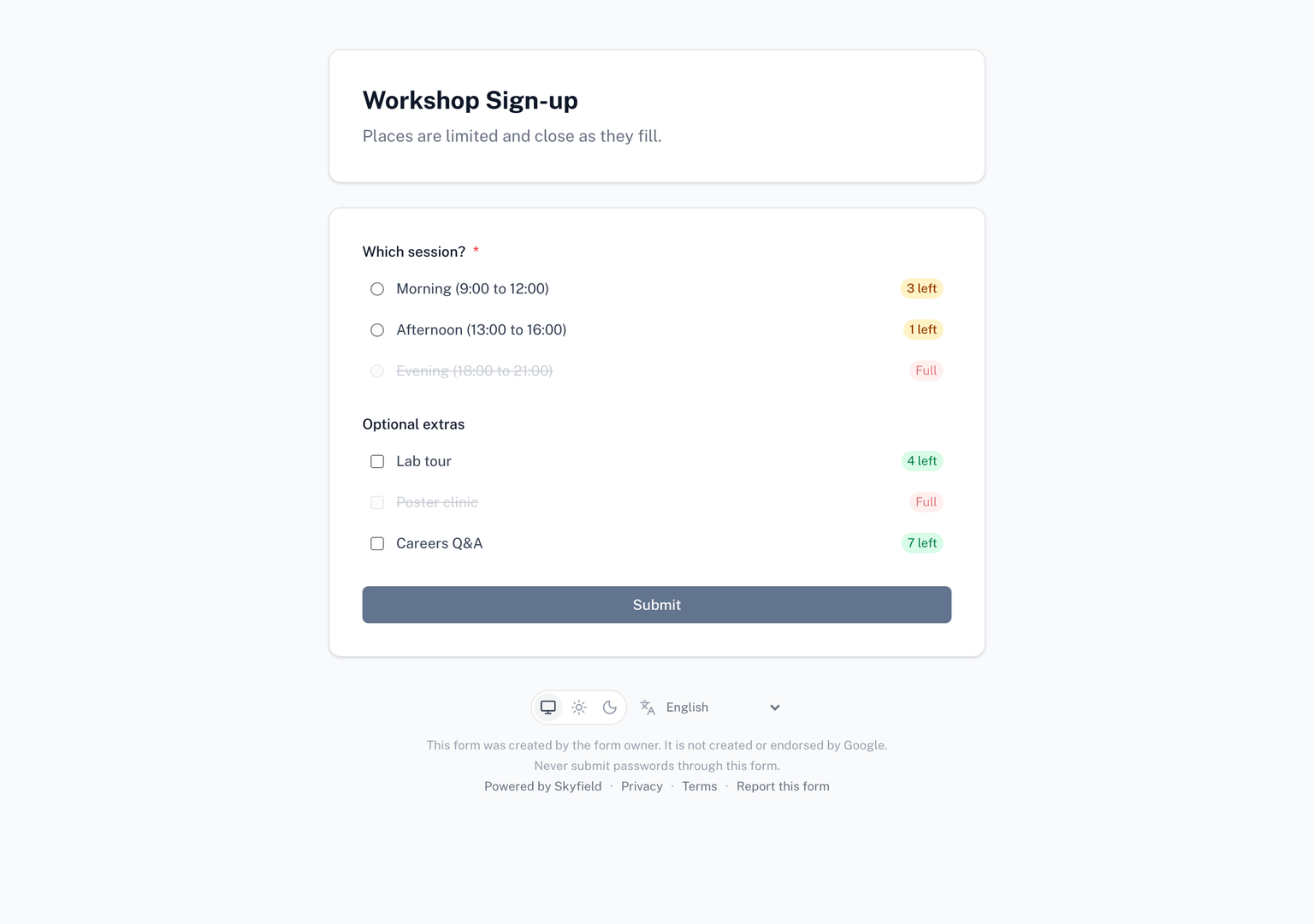
Want to see it move? Try a live form with a pretend crowd before you install anything.
Try a live formWhy a live form exists
Add-ons that work on a native Google Form, Form Limiter included, enforce a response limit from a trigger that Google runs after a response is already recorded. That usually takes seconds, but inside that window a form capped at 100 can end up with 103 responses when everyone submits at once.
On a live form there is no window. Each submission counts against the cap in a single all-or-nothing step at the moment it is submitted. The submission that would take the form past its limit is told the form is full, and everyone with the form open sees it close at the same instant. A cap of 100 means 100, no matter how many people press submit at the same moment. Per-choice limits work the same way: the last spot in a session can only go to one person.
What respondents see
The live link does more than mirror your form:
- The form closes at the cap, for everyone at once. The moment the last response lands, every open page shows your closed message instead of the questions, not on the next person's page load.
- Spots left, live. Every choice with a limit shows how many spots remain, for example "3 left" or "Full". The counts update as other people submit, with no page refresh, and the badge becomes more prominent when only a few spots are left.
- Multi-page forms render as pages. Sections from your Google Form become pages, "go to section based on answer" routing on choices is respected, and a straight-through form shows respondents how far along they are.
- Their language and their device. The live form follows the respondent's language and works on a phone as well as a desktop.
What changes when you go live
- You share a different link. Respondents answer at the live link. The add-on shows it in the sidebar, ready to copy or hand out as a QR code.
- The add-on offers to close the original Google Form. Responses submitted through the original Google Forms link are not counted, so leaving it open would let people around your cap. When your first limit goes live, the add-on asks once whether to close the original; the closed form points respondents at the live link. You can decline, and the add-on reopens a form it closed when you reset or uninstall it.
- The live form has its own settings. The response cap, who can respond, what the page looks like, an opening and closing window, email notifications and a Google Sheet copy of the responses are all set in Live form settings, separately from your Google Form's own settings.
- Your form's structure is stored on Skyfield's servers. The questions, choices and limits of the live form live with us so the link can enforce them. What is stored and for how long is described in the privacy policy, and you can ask us to delete a live form and its responses at any time.
- Responses live with the live form. You can view and export them as CSV from your live forms on skyfield.cloud, or have them copied to a Google Sheet. Access to your responses stays open permanently, including after your plan ends.
When you should not use it
Most forms do not need a live form. If a handful of responses over the limit on a busy minute is an inconvenience rather than a problem, a native Google Form with Form Limiter is simpler: respondents stay on the Google Forms link they know, and nothing about your form moves.
A live form earns its place when the number is the promise: a giveaway with exactly 50 prizes, a registration where seat 101 does not exist, time slots opened at a fixed hour, anything where "the last one" matters and everyone arrives at once.
Support
- Contact Us - Get in touch