
Per-Choice Limits
A total response limit caps the form. A per-choice limit caps one option, and the live form refuses the submission that would take one place too many.
Setting limits
- Open your Google Form
- Click the Add-ons (puzzle piece) icon, then Form Limiter Live, then Start
- Open the Questions tab
- Click a question to open its limits
- Type a number next to each choice, and leave anything unlimited blank
- Click Save
The sidebar confirms Limits are live. That message means the cap has reached the live form, not just your browser.
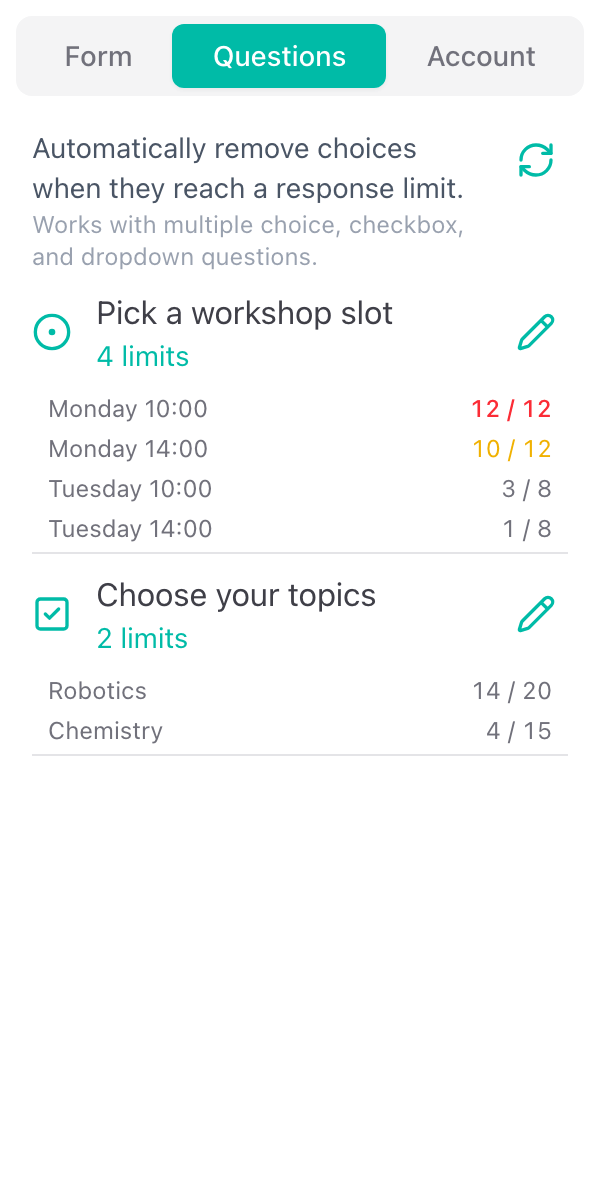
Back on the question list, each capped choice shows how many places are taken against its limit, for example 10 / 12, turning amber as a choice nears its limit and red once it is full.
Supported question types
- Multiple choice
- Checkbox
- Dropdown
A checkbox question spends one place for each option ticked, so a respondent choosing three options takes a place from each of those three.
How it holds under a rush
Every submission claims all of its places in a single all-or-nothing step, with the row for each choice locked while it happens. Two people pressing submit in the same instant cannot both take the last place: one succeeds, the other is told the choice is full and picks again.
What respondents see
- A badge on each capped choice showing the places left, for example "3 left"
- The badge becoming more prominent as the number gets small
- "Full" and a struck-through, unselectable option once a choice is at its limit, on every open page at the same moment
Choices with no limit carry no badge at all, so a form with two capped options and eight open ones does not look like a form full of counters. You can hide the numbers altogether, or hide full choices instead of crossing them out, under Presentation.
Editing the form afterwards
Keep editing in Google Forms. Renaming a choice, adding one, or reordering the list is picked up on the next sync, which happens when you open the sidebar or press Sync now.
Renaming a choice starts it from zero: the count follows the choice text, so "Morning" and "Morning session" are two different things as far as the count is concerned. Rename before you share the link, not after.
One pool across a whole question
Form Limiter Live limits the form and individual choices. If you need one shared number across all of a question's options, "any of these five sessions, but 40 people in total", that is Choice Eliminator Live.
Use cases
A capped registration with sessions inside it. 200 places on the form, 40 in each of five sessions, and neither number can be overshot.
Appointment and time slots. Capacity 1 on each slot, so a slot is bookable exactly once.
Trips, equipment, and stock. A checkbox question with one number per item.