
Limits
| What | Limit |
|---|---|
| Free quizzes without a paid plan | 3 per month |
| Free graded answers without a paid plan | 50 per month |
| Quiz reads on any plan | 50 in 24 hours (fair use) |
| Pasted text | About 20,000 characters per quiz |
| Uploaded or Drive file | 3 MB |
| Points per question | 0 to 100, whole points |
| Feedback per graded answer | 240 characters |
Free quizzes
Without a paid plan, Form Quiz gives you 3 free quizzes a month. A quiz is one successful read: a pasted text, an uploaded file or photo, or a Drive file turned into keyed questions.
- A read that fails or finds no questions does not count.
- Keying a Google Form you already have does not count.
- The count resets on the 1st of every month (UTC).
The dialog and the sidebar show how many free quizzes are left this month. When none are left, the dialog says No free quizzes left this month.
Free graded answers
Without a paid plan, 50 typed answers a month are graded by AI. Each typed answer scored is one graded answer. The sidebar shows how many are used, for example 12 of 50 free answers graded this month.
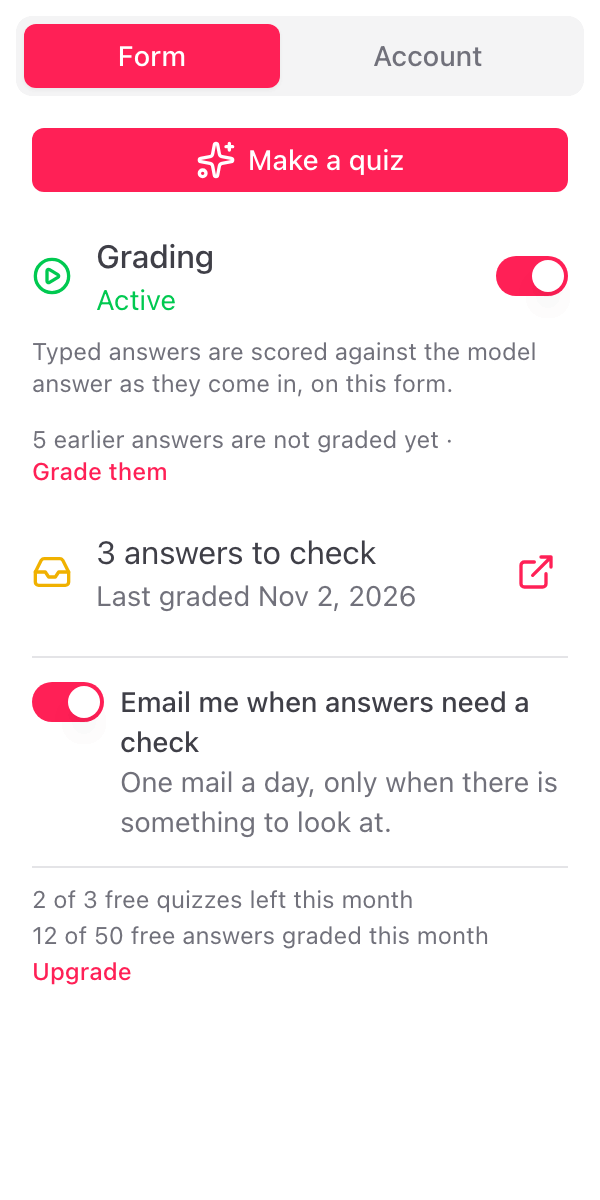
Past 50 graded answers
Answers past the 50 are not graded. Nothing is lost:
- They stay without a score in Google Forms.
- They are listed in the sidebar's answers to check, and in the daily email as Not graded: no free answers left this month.
- After you upgrade, or after the count resets on the 1st, click Grade them in the sidebar to grade them. See Grade earlier answers.
Paid plans
A paid plan has no monthly count: unlimited quizzes and unlimited graded answers for normal use. The fair-use ceiling of 50 quiz reads in 24 hours applies to every plan and stops bulk and automated use. If you reach it, the dialog says You've reached today's limit. Try again tomorrow. Email info@skyfield.cloud if you need more. The details are in our terms. See pricing.
Longer texts and files
A pasted text over the limit is refused: the dialog says That text is too long. Paste it in parts and make a quiz from each.
A file with more text than the quiz maker reads at once is read from the start. Options then says, under Assumptions made, that only the first part was used.
File types
PDF, Word (.docx), PowerPoint (.pptx), text, Markdown, CSV, JSON and images (PNG, JPG, WebP, HEIC). From Google Drive also Google Docs, Sheets, Slides and Forms.
Automations per Google account
Grading uses a Google Forms automation on each form where it is on. Google allows each account 20 of these per add-on. When you reach it, the sidebar says so: switch grading off on a form you no longer use, then switch it on again where you need it.